


Still Waiting on Your Tax Refund: If you’ve been waiting for your tax refund, you’re not alone — and you’re likely wondering, “Where’s my refund? Why the delay?” Tax season is a stressful time for many, especially when you’re eagerly anticipating that refund to catch up on bills, invest in something special, or simply treat yourself. While waiting can feel frustrating, rest assured there are steps you can take to track your refund status and ensure everything is moving forward smoothly.
In this article, we’ll guide you on how to track your IRS tax refund status like a pro. You’ll learn how to check your status online, what can delay your refund, and how to avoid common mistakes that could slow down the process. This guide is easy to follow and designed for both the casual taxpayer and the more experienced filer looking for additional insights.
Table of Contents
Still Waiting on Your Tax Refund
While waiting for your tax refund can be stressful, tracking it doesn’t have to be a mystery. The IRS “Where’s My Refund?” tool and IRS2Go app make it easy to check your refund status. The e‑file + direct deposit method ensures the fastest refunds, while avoiding errors and ensuring your identity is secure helps prevent unnecessary delays. Stay informed, stay calm, and check back periodically for the latest updates.
| Topic | Details |
|---|---|
| Official Refund Tracker | IRS “Where’s My Refund?” — Updated daily (official IRS tool) |
| Typical Refund Timeline | ~21 days for e‑file + direct deposit; longer for paper or amended returns |
| Required to Track | SSN/ITIN, filing status, exact refund amount |
| Phone Support | IRS automated refund line: 1‑800‑829‑1954 |
| Recent IRS Changes | Phasing out paper checks, pushing direct deposit for faster delivery |
| Common Delay Causes | Math errors, missing info, credits (EITC/ACTC), identity checks, staffing/time of year |
| Security Tip | IRS won’t email/text you for info — avoid scams and phishing calls |
What Exactly Is a Tax Refund?
A tax refund is simply the money you get back from the IRS when you’ve paid more in taxes than you actually owed. For most Americans, the IRS calculates the amount of tax you owe based on your income, deductions, credits, and previous tax payments. If your total tax payments (usually deducted from your paycheck) exceed what you owe, you’re entitled to a refund.
The most common form used for individual taxpayers is Form 1040, where income, deductions, and tax credits are reported, and your refund amount is calculated based on these details. Refunds typically come in the form of direct deposit to your bank account or a paper check mailed to you by the IRS.
Still Waiting on Your Tax Refund: How to Track Your Refund
Now that you know what a tax refund is and how it’s calculated, let’s dive into how you can track your refund and see where it is in the process.
Step 1: Give the IRS Some Time
One of the first things to understand is that the IRS doesn’t process your refund immediately. Here’s what you need to know about timing:
- E‑filed returns: If you’ve e‑filed your return, wait 24 hours after the IRS acknowledges that they’ve accepted it before checking your refund status.
- Paper returns: Paper returns take significantly longer to process. If you filed a paper return, you should wait up to 4 weeks before checking the status.
The IRS needs time to review, process, and approve the tax returns before they can confirm when and how your refund will be issued.
Step 2: Visit the Official IRS Tracker
The IRS “Where’s My Refund?” tool is your best resource for tracking the status of your refund. It’s the official tool provided by the IRS and is updated once a day.
Step 3: Enter Your Information
To access your refund status, you’ll need to enter a few key pieces of information:
- Your Social Security Number (SSN) or Individual Taxpayer Identification Number (ITIN)
- Your filing status (e.g., Single, Married Filing Jointly)
- Exact refund amount from your tax return
Make sure you have the correct figures when entering this information. A small error (like a typo in your SSN or the refund amount) could result in incorrect information being shown.
Step 4: Review Your Refund Status
Once you’ve entered your details, the tool will display one of the following statuses:
- Return Received: The IRS has accepted your return and is processing it.
- Refund Approved: Your refund has been approved, and they’ll provide a projected refund date.
- Refund Sent: Your refund has been issued, either via direct deposit or mailed check.
The tool updates once every 24 hours, typically overnight, so there’s no need to check multiple times a day.
Still Waiting on Your Tax Refund: Typical Refund Timelines (Real‑World Look)
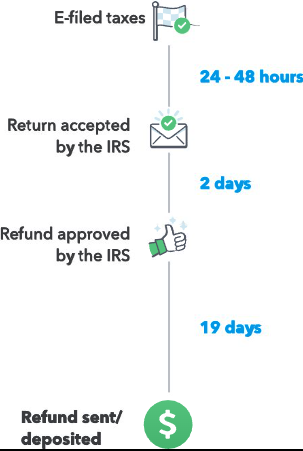
You might be wondering: How long does it actually take to get my refund? Well, there’s no exact answer, as processing times depend on several factors. However, here’s an estimate based on current IRS guidelines:
| Filing Method | When Status Appears | Typical Refund Time |
|---|---|---|
| E‑file + Direct Deposit | ~24 hours after acceptance | ~21 days or less |
| E‑file + Paper Check | ~24 hours after acceptance | ~4 weeks |
| Paper Return via Mail | ~4 weeks | 6–9+ weeks |
Generally, e‑filed returns with direct deposit are the fastest, while paper returns and those requiring additional reviews tend to take longer.
Why Might Your Refund Take Longer?
Even if you followed all the steps correctly, there are several factors that could delay your refund. Here are a few reasons why your refund might take longer than expected:
Math Mistakes or Missing Information
If you made any errors on your tax return, such as incorrect numbers or missing data, the IRS may need to hold your refund while they verify and correct the information. Double‑check everything before filing to avoid delays.
EITC and Child Tax Credits
If you’ve claimed Earned Income Tax Credit (EITC) or Additional Child Tax Credit (ACTC), the IRS may hold your refund longer to verify that you qualify for these credits. Refunds for these credits are often issued later in the season, usually starting in early March.
Identity or Security Checks
If the IRS detects potential issues with your identity (e.g., mismatched name, address, or SSN), your refund may be delayed for additional security checks. These extra steps are meant to protect you from fraud, but they can take time.
Staffing & Seasonal Peaks
The IRS is busiest in the months immediately after tax season, so if you file closer to the April deadline or during periods of high volume, it might take longer for your refund to be processed. Processing times can also be affected by staffing shortages or budget constraints.
If You Didn’t Provide Bank Information
Starting in 2026, the IRS is phasing out paper checks for refunds in favor of direct deposit. If you didn’t provide accurate bank account information, your refund will be delayed until you update your account information with the IRS.
Still Waiting on Your Tax Refund: Other Ways to Check Your Refund (Besides Online)
Not everyone prefers using online tools. If you’re someone who’d rather check your refund status over the phone or through an app, here are your options:
IRS2Go Mobile App
The IRS2Go app is a free and secure mobile application that allows you to check your refund status, make payments, and get important tax information. The app is available for both iOS and Android devices. (irs.gov)
Phone Support: Automated
If you prefer calling over online tools, the IRS has an automated refund hotline:
1‑800‑829‑1954
This line is available 24/7 and will tell you the status of your refund. Keep in mind that wait times can vary, especially during peak tax season.
Scam Warnings — Don’t Get Fooled
Unfortunately, tax season also attracts scammers looking to take advantage of people waiting on their refunds. Here’s how to protect yourself:
- The IRS will never contact you by email or text asking for your refund status, bank information, or personal details.
- If you receive an email or phone call claiming to be the IRS and asking for sensitive info, hang up and report it immediately.
- Always go directly to the official IRS website or use the IRS2Go app to check the status of your refund.
Stay cautious and avoid phishing scams.
Smart Tips to Speed Up Refunds Next Time
If you want to receive your refund as quickly as possible, consider these tips for next year:
E‑file + Direct Deposit
E‑filing with direct deposit is the fastest and most efficient way to receive your refund. The IRS processes e‑filed returns much faster than paper returns.
Use IRS Online Account
Set up an online account with the IRS. This account provides quick access to your refund status, tax history, and even copies of past returns. Having an online account is especially helpful if you need to file amended returns or make updates to your personal information.
File Early and Accurately
The earlier you file, the better. But accuracy is key. Avoid rushing through your return. Ensure all numbers, forms, and supporting documentation are correct to prevent delays.
Watch Your Mail (No, Really)
The IRS might send you a letter requesting more information. If you get a notice, respond quickly to avoid any further delays in your refund.
New IRS Guidance Could Change How Millions Claim Tax Benefits in 2026 – Check Details
Some IRS Refunds May Be Delayed Until March — Who’s Most Affected
February 2026 Payments Explained — What’s Real About Stimulus, Deposits, and Refund Claims